Analytics
You can access the analytics page on the StackSpot AI Portal to examine usage patterns of the organization's most popular content and top users. This insight will helps you understand your workflow.
Overview
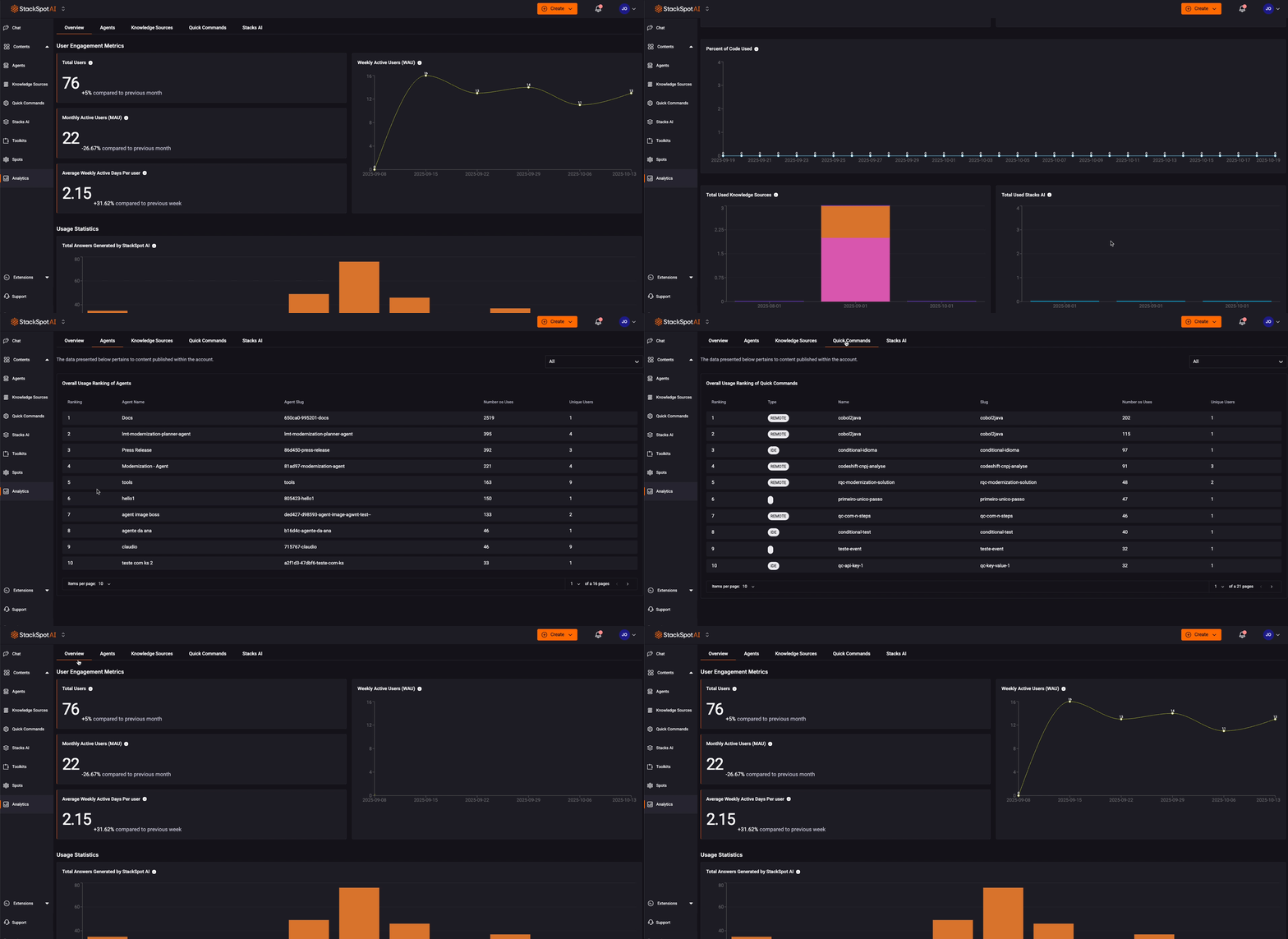
You can see the following data:
- User Engagement Metrics
- Total Users: The total number of registered users who create prompts.
- Monthly Active Users (MAU): The number of users who engage with the platform each month.
- Average Weekly Active Days Per User: The average number of days per week that users engage with the platform.
- User Statics
- Total answers generated by StackSpot AI: Total answers generated by StackSpot AI over time.
- User usage overview for the last 30 days
- The total number of prompts divided by the number of active users during that period.
- Token consumption per day
- Total number of tokens used in the account each day.
- Prompts per user
- Total number of prompts divided by the number of active users during that period.
- Quick Command execution
- The number of times Quick Commands were executed.
- Quick Command execution by type
- The number of Quick Command executions categorized by type, weekly.
- Percent of code used
- This refers to the percentage of AI-generated code that users effectively utilized.
- Total used Knowledge Sources
- This is the total number of Knowledge Sources employed. A Knowledge Source is deemed used when it has contributed to generating a response.
- Total used Stacks AI
- This indicates the total number of Stack AIs used. A Stack AI is considered used when it has helped generate a response or provided code suggestions.
StackSpot AI Contents
You can view the overall usage ranking of Agents, Knowledge Sources, Quick Commands, and Stack AI.
Token Usage
You can monitor and export the monthly consumption of Prompt and Embedding tokens in your StackSpot Account.
Token Types
In the Tokens section, you will see two types of metrics: Prompt and Embedding. See more details below:
Prompt Tokens
Prompt Tokens are units of text, such as words or characters, that language models use to process and generate responses.
The Prompt token count is an estimate and may vary depending on the provider used, such as OpenAI or Azure.
Embedding Tokens
Embedding Tokens are units of text converted into numerical vectors so the model can understand and compare meanings.
Tokens used for embeddings are free of charge.
Enterprise Account
Prerequisite
- You must have Account Admin or Sys_Admin permissions.
Accessing Enterprise Analytics
You can check your contracted limit, current usage, and overage to manage costs and actions in your Account. Follow these steps:
Step 1. Access the StackSpot AI Portal;
Step 2. Go to the 'Analytics' section;
Step 3. Click on the 'Tokens' tab. In 'Category', select Prompt or Embeddings;
Step 4. Select the desired period for analysis. The following information will be available:
- Tokens consumed this month: The total tokens consumed, including both input and output prompts.
- Contrackted limit: The total number of tokens contracted in the Account for the month.
- Available balance: It is the difference between the contracted limit and the total used in the month.
- Limit Usage: The percentage of the contracted limit already used in this month.
- User consumption: View each user's individual usage compared to the account total and their participation percentage.
If an Embedding limit is configured, the usage, limit, and overage will be displayed.
Freemium Account
In a Freemium Account, you can only view your own token usage. The access steps are the same as for Enterprise accounts.