Create Agent + Toolkit + QC
This guide demonstrates how to integrate a Toolkit with Quick Commands and Agents in StackSpot AI to list dog breeds using the DogAPI.
Prerequisites
Follow the steps below:
1. Create a Toolkit
A Toolkit allows you to connect external APIs and use them as Tools within StackSpot AI. Follow the steps below:
Step 1. Access the StackSpot AI Portal and go to the Toolkit section;
Step 2. Click the 'Create Toolkit' button. Fill in the following fields:
- Name: DogAPI
- Description: Lists and describes dog breeds.
Click the 'Create' button.
Step 3. Click the 'Add Tool' button to add a Tool that calls the DogAPI to list dog facts, breeds, etc.
Click 'Add manually' and fill in the tool information using the DogAPI documentation.
Example:
- Tool name: List facts
- Method: GET
- Tool description: Returns a list of interesting dog facts.
- Invoke URL: https://dogapi.dog/api/v2/facts
- Parameters:
[
         {
           "name": "id",
           "in": "path",
           "required": true,
           "schema": {
             "type": "string"
           }
         }
       ]
Add the other Tools following the same example. For more details, check the Swagger JSON on available endpoints and parameters.
2. Create an Agent
Create an Agent that can answer questions about dog breeds.
Step 1. Go to the 'Agent' section and click the 'Create Agent' button;
Step 2. Fill in the details for the Agent:
- Name: Dog Agent
- System prompt: You are an expert in dogs and breeds.
- Tools: Add the previously created Tools.
Step 3. Click the 'Save' button;
Step 4. Test your Dog Agent
- Ask the Agent: List the breeds.
- The Agent will show a list of dog breeds.
- Click the detailed mode to see more about the API request.
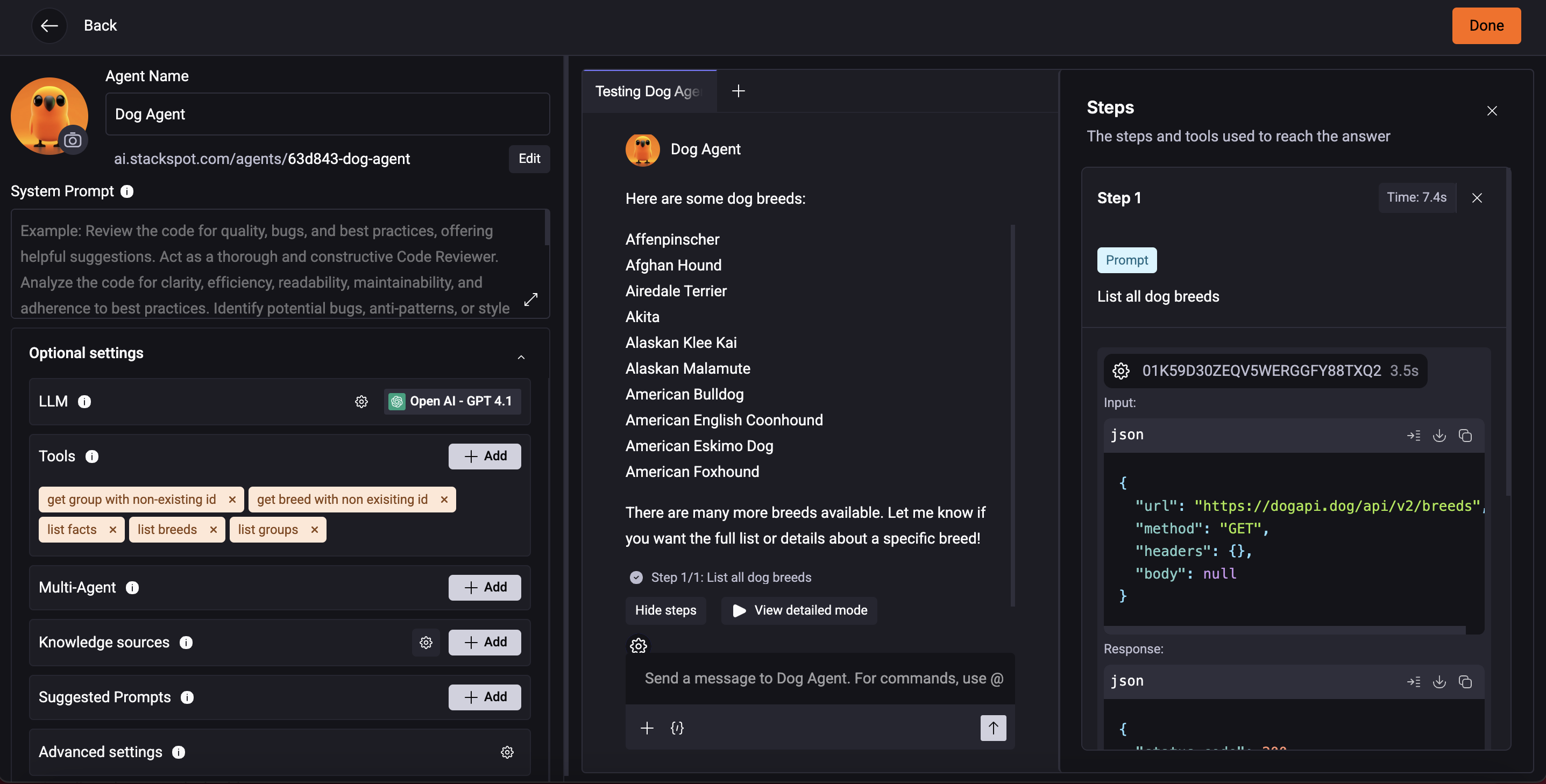
Step 5. To finish, click the 'Done' button.
3. Create a Quick Command
Step 1. Access the StackSpot AI Portal;
Step 2. Click the 'Quick Command' section. Then, click the 'Create' button then choose Quick Command;
Step 3. Select the Remote option and add the following:
- Quick Command Name: dog-qc
- Description: It is a command to list dog breeds.
Step 4. Select the 'Hello World' template. Then, click the prompt box and update the prompt text to:
Execute {{input_data}}
- On the 'Agents' tab, choose the Dog Agent.
Click 'Ok' to confirm.
Step 5. Click the 'Save and Test' button;
Step 6. On the Execute page, write down:
List breeds
Click the 'Execute' button.